
Sending via SMTP
Omnivery supports sending messages using SMTP submission. SMTP submission is a great option for systems that support sending via a custom SMTP server. It is ideal for integrations where implementing an API would be time-consuming or expensive.
Sending using APIs should always be preferred as it provides much more efficient and comfortable integration for developers.
Omnivery supports sending via SMTP. Our servers at smtp.omnivery.net are listening on port 587. We support insecure connections, but we strongly recommend upgrading to TLS encryption using the STARTTLS command.
Domain setup
Make sure you have your sending domains set up first. Please read the documentation on setting up domains.
Setting up credentials
Sending messages using SMTP requires authentication with the correct credentials. Before you start, make sure you have the correct domain selected in the top domain selection menu. SMTP user credentials are managed in the Credentials menu on the SMTP users tab. You will see a list of existing SMTP users here and have the ability to add new ones if your account has sufficient rights.
Click the Add user button and you will be presented with a dialog to enter the desired username (in the form of an email address), password, and note (to help you identify individual user accounts).
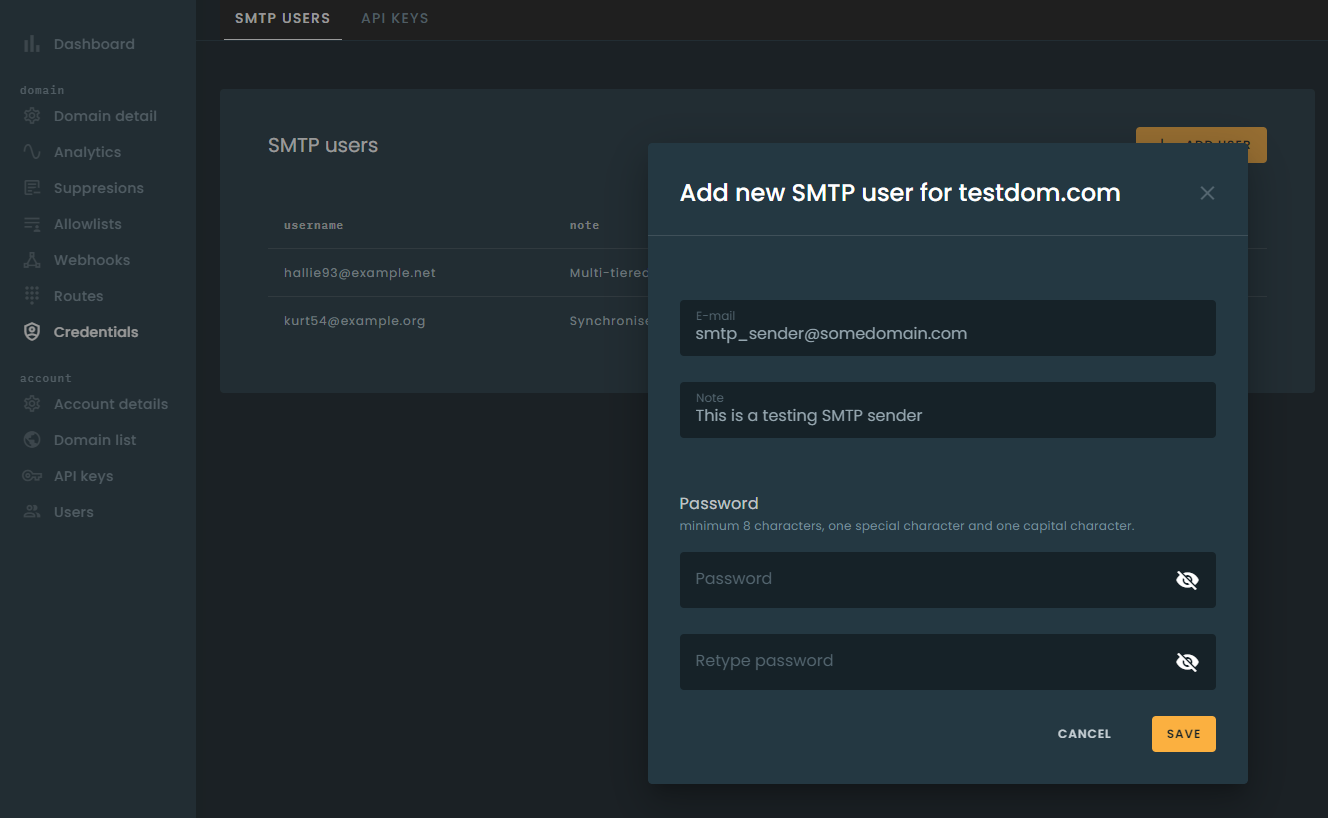
The email address you enter as a username does not necessarily have to be a working email address. Use of email addresses in domains under your control is strongly recommended.
Requirements
The SMTP communication must meet the following minimum requirements:
AUTH LOGINcommand must be performed to authenticate the session using credentialsMAIL FROMaddress must be from the sending domain, e.g., if your sending domain is ov.emaildemos.com, the address passed in the command must be @ov.emaildemos.com.RCPT TOcommand must be issued at least once. If multiple RCPT TO commands are issued, then all individual recipients will receive the same message but will be tracked independently.
The DATA transfer of the message content must conform to RFC5322. In addition to the standard, we have the following requirements:
- Only one
Fromheader is allowed. While the standard technically permits multiple From addresses, this is not supported by many large mailbox providers and would result in delivery issues. - Only one
Toheader is allowed. Multiple recipients should be separated by a comma in the single To header. - Only one
Ccheader is allowed. Multiple recipients should be separated by a comma in the single Cc header. - Only one
Subjectheader is allowed.
The
Fromheader address MUST be aligned with the sending domain, e.g., if your sending domain is ov.emaildemos.com, then your From header address must be either @ov.emaildemos.com or @emaildemos.com.
-
MIME headers provided in
DATAthat do not conform to our standards or are in conflict with our standard headers will be removed or replaced. -
Senders MUST honor the
4xxand5xxSMTP response codes as respectively defined by the SMTP standard.4xxtemporary failures should be retried at a later time with a minimum interval of 1 minute.5xxpermanent failures MUST NOT be retried, as such errors will not result in a different outcome no matter how many times they are retried.
Passing message options
When sending a message via SMTP, you can pass additional sending options via custom MIME headers listed in the table below.
| Header | Description |
|---|---|
| X-OV-Tag | Tag string used for aggregating stats. See Tagging for more information. You can mark a message with several categories by setting multiple X-OV-Tag headers. |
| X-OV-testmode | Enables sending in test mode. Pass yes if needed. See Sending in Test Mode. |
| X-OV-Track | Toggles tracking on a per-message basis. See Tracking Messages for details. Pass yes or no. |
| X-OV-tracking_click | Toggles click tracking on a per-message basis. Overrides domain-level setting. Pass yes or no. |
| X-OV-tracking_open | Toggles open tracking on a per-message basis. Overrides domain-level setting. Pass yes or no. |
| X-OV-Require-TLS | Use this header to enforce TLS encryption during message delivery. |
| X-OV-Recipient-Variables | Use this header to substitute recipient variables referenced in the message. |
| X-OV-Variables | Use this header to attach custom JSON data to the message. |
| X-OV-Template | Template filename to use to generate message content. |
| X-OV-Template-Variables | Use this header to pass JSON data to the template. Unlike X-OV-Variables, data passed in this header will not be passed in the message headers. |
| X-OV-Callback-URL | Set the webhook URL to post event data. Setting the URL at message level overrides the domain setting. |
| X-OV-Callback-Format | Set the format of webhook calls to use. Supported formats are bloomreach, mailgun. |
Message security
Errors and attacks are not uncommon, and we do our best to protect your account. Check out how we deduplicate messages and how you can further secure your domain.
Comments
Add a comment