
Setting up Domains
Domains are the main differentiatior to your mail streams and control what From address you will be able to use in your emails. There are no limits to the number of domains added to your account.
To understand the concept of sending domain you have to understand a bit about how domains work and how emails are being sent. Let's start with the basics.
Choosing the sending domain
Your sending domain is critical to the success of your future email sends. If your business is using a fragrancecorp.com domain for your website and marketing purposes it's more than likely that you also have business email addresses using this domain, eg. order@fragrancecorp.com, johndoe@fragrancecorp.com, etc. Your sending domain must not interfere with these emails.
It's a best practice to setup a sending domain as a sub-domain of your main domain, eg. news.fragracecorp.com or ov.fragrancecorp.com. By using a sub-domain your email stream will be separate from your main business emails while retaining the same domain name for consitency and brand protection. This will allow you to use a From address from the parent domain like news@fragrancecorp.com.
Domain alignment
Omnivery checks the domain alignment of all outgoing messages on both API and SMTP submission. If your From address is not within the domain space of your sending domain the message will NOT be accepted.
Another option would be to use a completely different domain like email-fragrancecorp.com. This is often driven by internal corporate policies but it is not a recommended practice. It is highly discouraged as this might seem like a phishing domain to anti-abuse filters. It may not be obvious why right away but let's look at these two email domains - email.bankofamerica.com and email-bankofamerica.com:
- A sub-domain (email.bankofamerica.com) is clearly related to bankofamerica.com as it can only be created by the controller of the bankofamerica.com domain. Spam filters at Gmail, Yahoo and other providers (also called MBP - mailbox provider) can assign the reputation and link it to the same organization.
- A new-domain (email-bankofamerica.com) is a completely distinct domain. There is no way for a mailbox provider's spam filter to accurately tell if this domain belongs to the bank or a bad actor trying to impersonate the bank.
If you are affected by such a corporate policy try to talk to your CISO and explain why this is a bad choice. Not only registering a new domain will require additional resources but will make it that much more difficult for the security team to manage such specialty domains. Using a sub-domain is a clear win for brand security and will allow your brand to leverage domain protection through DMARC policies.
Stay on-brand
Always use sub-domains of your main brand domain whenever possible. Your emails will be more authentic to the spam filters as well as recipients and helps you to protect and elevate your brand.
Separating mail streams
It's important to separate different types of messages into separate mail streams. By using different sending domain for the bulk emails and transactional emails you will be able to make it easier for MBPs to classify your messsages correctly.
Going back to the above example you could use the news.fragrancecorp.com sending domain for our bulk emails sent from CRM or CDP. In addition you could create orders.fragrancecorp.com to send your transactional emails from your e-commerce platform.
Each mail stream may have a different type of requirements when it comes to it's content as well as technical parameters. Better distinction between the different mail streams will result in improved deliverability. You should not only use a separate sending domain but a different From address as well. In this case the bulk emails would be sent from info@fragrancecorp.com using news.fragrancecorp.com sending domain and transactional emails from sales@fragrancecorp.com using orders.fragrancecorp.com sending domain making a clear distinction between the two. The recipients would be able to reply to the right address for the right information.
Transactional messages
Transactional messages should ALWAYS be separated from your bulk emails. Contact our team to enable transactional mode on your domain.
Adding your domain
Adding your domain is as easy as it could be. Head over to the Domain list in the left menu and click Add domain button.
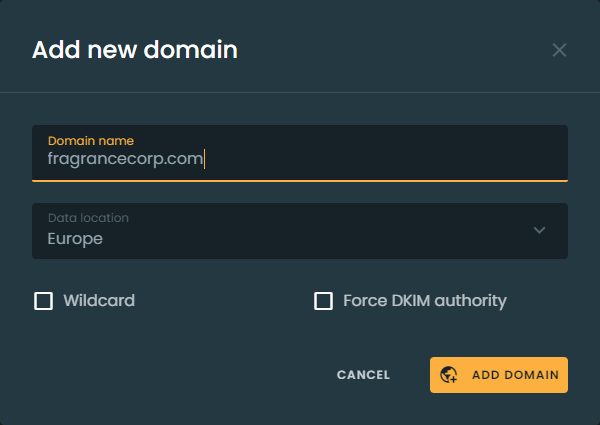
All you have to do at this point is to enter the domain name for your sending domain and select the data location for your domain data. These are the only two settings you won't be able to change later in domain detail.
Once you click the Add domain button your domain will be added to your list of domains and will be subject to our vetting process.
Domain vetting
Every domain added to Omnivery is subject to vetting just like every customer is before we sign the contract. The domain vetting adds an aditional layer of protection for our platform by preventing vetted customers or agencies from adding domains with bad reputation or questionable sending practices.
So what is domain vetting? We take a hard look at each domain and investigate all it's aspects. We wont tell you the exact process for obvious reasons but let us just say that it's not just about blacklists. The process usually takes 1-3 working days and we have no intention to drag our feet. At the same time you are free to start setting up your domain records as shown on Domain detail page. Once your domain has been approved you will be able to verify it's setup that much faster.
We've mentioned this before but for us deliverability always comes first. That means that we often have to make some hard decisions - rejecting domains.
Rejected domains
Rejected domains can reapply for new vetting after a 12 month period. No requests for re-vetting a domain prior to a 12 month period will be accepted.
Domain alignment
Domain alignment is the term used to describe the alignment of individual parts and elements of an email message. The key parts for domain alignment are:
- RFC5321 "mail from" domain - This "from" address is invisible to the recipient and is often refered to as Return-Path, Envelope-From, or mfrom. We will construct this "from" address on your behalf using the sending-domain in the domain part, eg. unique-identifier@news.fragrancecorp.com. This domain also contains the Sender Policy Framework (SPF) authentication record.
- RFC5322 "From" domain - This is the "From" address displayed to the recipients in their email clients and is often refered to as Visible From or Friendly From. This address MUST be provided by you during the submission eg. info@fragrancecorp.com and is transmitted in message header
From:. - DKIM domain - The domain used to DKIM sign your message. We will add your sending domain DKIM signature to all outgoing messages. As you will see in domain detail we require multiple DNS records to be added to your DNS. Two of those records are related to DKIM signing.
- PTR domain - The domain name from the sending IP address. This type of alignment is mostly used as a fallback in cases where the standard alignment verifications methods fail. Gmail uses PTR domain for unauthenticated messages to get at least one additional signal of authenticity. PTR domain alignment requires dedicated IP addresses for each sending domain.
Receiving mail servers check domain alignment of incoming messages for two distinct authentication method alignments:
-
SPF alignment - checks if the mail from domain matches the From domain.
-
DKIM alignment - checks if the DKIM domain matches the From header domain.
In both cases alignment can be either relaxed or strict depending on how the alignment is achieved.
If the match is on organizational level domain, eg. mail from domain unique-identifier@news.fragrancecorp.com or DKIM domain matches From header domain info@fragrancecorp.com it's called relaxed alignment.
When the domains are an exact match, eg. mail from domain unique-identifier@news.fragrancecorp.com matches or DKIM domain matches the From header domain info@news.fragrancecorp.com exactly it's called strict alignment.
The goal is to achieve full alignment whenever possible - meaning both SPF and DKIM are aligned.
Brands often take advantage of DMARC policies to prevent domain abuse by publishing an enforcement policy (quarantine or reject) to signal to the receiving mail servers how to handle messages that fail authentication.
Always aligned
The way we validate your domain setup and your messages during submission ensures that messages from our platform are always sent fully aligned.
Comments
Add a comment