
Domain Detail
This page gives you a complete overview of your sending domain, it's settings, DNS records and allows you to migrate your data from other platforms.
Domain status
The top-left part of the panel shows the current status of your sending domain. The initial status is "Vetting in progress". The vetting process itself is outlined on the Setting up domains page.
The domain status has the following progress flow:
Once the vetting is complete your domain will be ready for the next stage - it's verification. During this process we check the DNS records of the domain to be set according to our requirements displayed in the DNS records area. Once records are verified your sending domain will become active and ready for use.
Domain records
There are two types of DNS records that you will need to set up in your sending domain DNS zone:
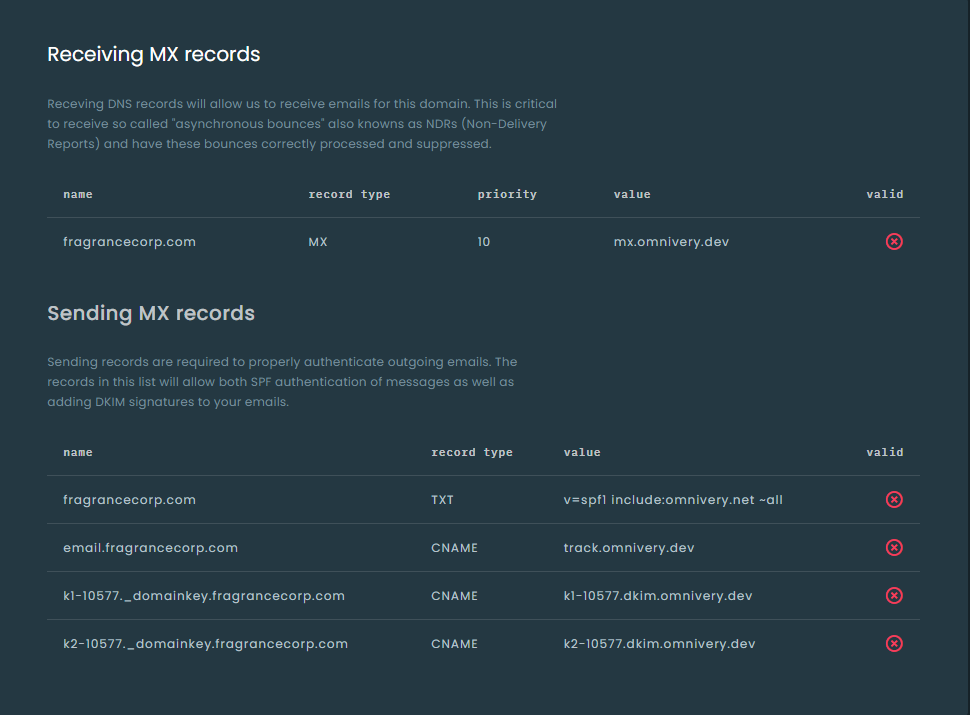
- Sending records - these records are essential to correctly facilitate delivery of outbound emails. The records include SPF authorization, DKIM keys and a record for tracking email opens and clicks.
Depending on the domain you have added there will either be two CNAMEs for DKIM records (for organizational level domains), or four if you have added a subdomain. In case of a subdomain the 2 additional CNAME records are optional for organizational level DKIM signing for strict alignment.
Strict alignment of DKIM signatures will be mandatory starting January 1st 2024. We strongly suggest deployment of all DNS records in timely manner.
- Receiving records - this record is required for us to receive inbound emails for your sending domain. The inbound emails include remote bounces (asynchronous bounces), unsubscribe emails, feedback loops and emails intended for your domains and processed according to your Routes.
Do not remove records after validation
Make sure these records remain set even after your domain has been validated as these records will be required going forward. We will periodically check your domain records to make sure your sending domain settings are always correct.
Domain settings
Each domain has a full set of settings that affect outgoing messages, their headers, tracking and as well as your daily rate limits. Each setting is described in the UI but we'll try to provide some additional context here.
- Wildcard - we are very strict about domain alignment and making sure the used sending address and visible From address align with the sending domain. When you need to permit use of subdomains you can achieve this by setting the domain as
Wildcard. As a result the sending domain mybrand.com could be used to send email with a visible From of email@mybrand.com as well as email@info.mybrand.com. It will not permit email@my.info.mybrand.com as that is a subdomain too far removed from the original mybrand.com domain. - Strict privacy - does your company have very strict policies of data processing and retention by third parties? Then this is the setting you may want to enable. Strict privacy mode prevents any personal information to be stored in our system. All identifiable personal information will be fully obfuscated the moment the message is processed. You'll see that the analytics will not show specific recipients but
-- anonymized --instead and the same will apply for suppression lists. This will also affect the extent of information posted back to you via Webhooks as for some of the events we may no longer be able to identify the original recipient. - Email validation - our API provides functions to validate recipient email addresses and get information about the address availability, type and quality. To provide the best possible service we have partnered with Kickbox which results in data transfer to 3rd party sub-processor. Rest assured that we always use a geographical instance of Kickbox matching your domain setting (US or EU). To prevent accidental data transfer this option must be enabled and transfer acknowledged before the Email validation features of API will be made available.
- Email tracking - being able to tell if an email has been delivered or not is critical for most use cases. Email tracking does exactly that - it collects and stores information about whether the message has been delivered or bounced. Email tracking itself doesn't collect any personal information and as such has no privacy impact since the information is retrieved during SMTP communication between the sending and receiving servers.
- Open tracking - allows you to collect information about recipients opening messages. This is done by adding a tiny tracking image into every message. When the recipient opens the message and the image is loaded this signal is recorded along with information about the recipient's IP address, User Agent (email client/browser) and information derived from these data points like approximate geo-location, operating system, device, etc. Information collected will be passed to your webhook and available in the analytics.
- Click tracking - allows you to collect information about recipient's interaction with links in messages. This is done by replacing the original links in the messages with so called tracking links which will direct the recipient to our server first before redirecting to the original destination URL. During this process the recipient's IP address, User Agent (email client/browser) and information derived from these data points like approximate geo-location, operating system, device, etc. Information collected will be passed to your webhook and available in the analytics.
- Unsubscribe tracking - allows you to track recipient's unsubscribing from messages. It's extremely important that recipient's have an easy way to opt-out of receiving marketing messages. Omnivery always tracks unsubscribes performed by recipients in email clients using the built in List-Unsubscribe functionality and spam-complaint feedback loops where available. Using unsubscribe tracking allows you to add a custom opt-out link to the body of the messsage.
- Reply-to address alignment - enforcing alignment of Reply-to address with the sending domain is one of many unique security features we offer. It prevents messages with Reply-to address using a different domain than the one used to send the message. This could be used to prevent accidental errors as well abuse by malicious actors in case of leak of API credentials.
Tracking with 3rd party marketing platforms
Most marketing automation and customer data platforms use their own methods of tracking recipient engagement and email & open tracking settings of your sending domain need to be disabled. You should consult the proper open/click tracking settings with your provider to prevent double-tracking which may result in inaccurate data collection and reduced deliverability for your messages.
There are some settings that can only be set by our support staff or are determined automatically by the system.
- Transactional - transactional messages - messages with content that is not marketing in nature but rather inform about actions to be taken (password reset, account activation), updates perfomed (order confirmation, change of terms), etc. need to be treated and handled separately from marketing messages. They need to be as distinct from the marketing as possible - different sender addresses, separate IPs, but also have different headers so the receiving servers can easily identify them as transactional. Our support team can enable
Transactionalmode on your domain at request. Check out the Setting up domains section for details on separating mail streams. - Domain rate limit - every sending domain has it's own rate limit. This rate limit has two purposes - to protect our platform from abuse and to protect your sender reputation. Over the years anti-spam systems moved away from simple IP blocklists and rate limits to domain based reputation. This also means that each domain needs to be properly warmed-up over time and the rate limit facilitates that - it prevents excess messages to be sent. The rate limits are automatically increased by 20% when the sending domain uses 75% of it's current rate limit.
Rate limit adjustments
While the rate limits may seem inconvenient at first, they guarantee that your domain is properly warmed up and it's reputation is not affected by volume spikes. We understand there might be situations when you will need to send volumes higher than your usual daily rates and our support team will be happy to consult setting custom rate limit for your domain.
- Email Journal - Omnivery supports native Email Journaling - having an exact copy of a sent message stored in archive. This is done by sending a "copy" of the message to a give email address. While similar to adding a
bccrecipient to your messages, journaling can be enabled/disabled without changes to the sending process. This is especially helpful in environments where changes to the sending infrastructure are not possible (eg. CRM systems, Billing systems, etc.). In addition our process generates an EXACT clone of the message for journaling purposes including all the DKIM signatures.
Using Email Journaling
Omnivery doesn't archive messages, only sends an exact copy to a given address. It is highly recommended to use a commercial Email Journaling/Archival system. Use of regular mailboxes is highly discouraged as the receiving servers may not be able to handle the volume of messages or impose restrictions which may affect deliverability.
Comments
Add a comment